> ## Documentation Index
> Fetch the complete documentation index at: https://docs.thrads.ai/llms.txt
> Use this file to discover all available pages before exploring further.
# Ad Formats
> Placement types available on the OpenRTB path.
One format is available on the oRTB path today: **sponsored message** — a native card rendered inline in the chat stream. The impression is always a single Native 1.2 unit. Full asset spec in [BidRequest](/dsp/guides/ortb/bid-request).
The card renders in one of two modes depending on which image asset you return:
* **image** — hero product photo + copy
* **text** — advertiser logo + copy, no hero image
## Which mode applies
The Native request offers two image assets:
| Asset id | `img.type` | Role |
| -------- | ---------- | ------------------ |
| 4 | `3` (main) | Hero/product image |
| 5 | `1` (icon) | Advertiser logo |
Both are optional in the request. Which one you populate determines the render:
| Asset 4 (main) | Asset 5 (icon) | Rendered as |
| --------------- | --------------- | ------------------------------------------------------------------------------------------- |
| Populated | Any | **image** — full card with the product photo. Logo (if sent) appears as a small brand mark. |
| Empty / omitted | Populated | **text** — compact card with the logo + copy. |
| Empty / omitted | Empty / omitted | Bid rejected — no visual to render. |
Rule of thumb: **send the product photo in asset 4 if you have one; otherwise send the logo in asset 5**.
### image
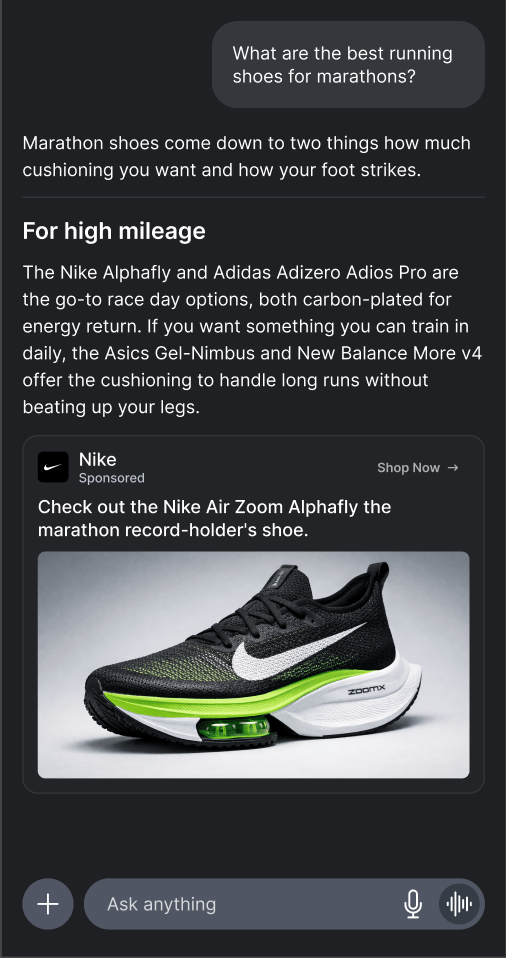 ```json theme={null}
{
"native": {
"assets": [
{ "id": 1, "title": { "text": "Check out the Nike Air Zoom Alphafly" } },
{ "id": 2, "data": { "value": "The marathon record-holder's shoe." } },
{ "id": 3, "data": { "value": "Nike" } },
{ "id": 4, "img": { "type": 3, "url": "https://cdn.nike.com/alphafly.png" } },
{ "id": 5, "img": { "type": 1, "url": "https://cdn.nike.com/logo.png" } },
{ "id": 6, "data": { "value": "Shop Now" } }
],
"link": { "url": "https://example.com/track/click/abc123" }
}
}
```
### text
```json theme={null}
{
"native": {
"assets": [
{ "id": 1, "title": { "text": "Check out the Nike Air Zoom Alphafly" } },
{ "id": 2, "data": { "value": "The marathon record-holder's shoe." } },
{ "id": 3, "data": { "value": "Nike" } },
{ "id": 4, "img": { "type": 3, "url": "https://cdn.nike.com/alphafly.png" } },
{ "id": 5, "img": { "type": 1, "url": "https://cdn.nike.com/logo.png" } },
{ "id": 6, "data": { "value": "Shop Now" } }
],
"link": { "url": "https://example.com/track/click/abc123" }
}
}
```
### text
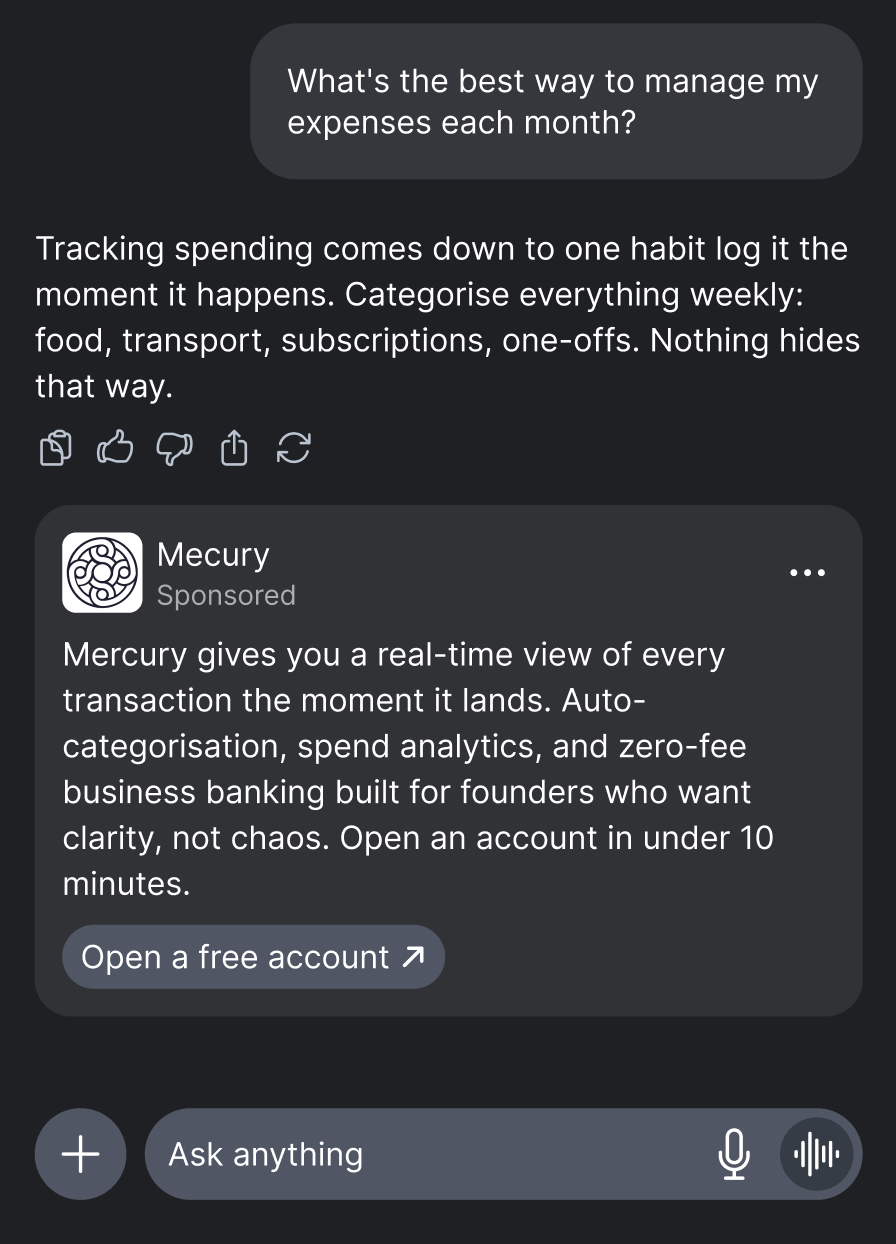 ```json theme={null}
{
"native": {
"assets": [
{ "id": 1, "title": { "text": "Best Running Shoes 2026" } },
{ "id": 2, "data": { "value": "Get 20% off premium running shoes today." } },
{ "id": 3, "data": { "value": "Acme Sports" } },
{ "id": 5, "img": { "type": 1, "url": "https://cdn.acmesports.com/logo.png" } },
{ "id": 6, "data": { "value": "Shop Now" } }
],
"link": { "url": "https://example.com/track/click/abc123" }
}
}
```
## Publisher constraints
The mode the publisher accepts is encoded in `imp[].tagid` — there is no separate `ext.thrad.config` flag to parse:
* `*_image_v1` — publisher accepts both modes. Asset 4 (main image) is optional; asset 5 (logo) is optional. Image preferred.
* `*_text_v1` — publisher cannot render images. The Native request omits asset 4 entirely and marks asset 5 (logo) as **required**. If your response includes `image_url` (asset 4) on a text-mode request, the SSP drops it server-side before render — your bid still wins on the logo if asset 5 is populated, otherwise the bid is silently lost.
The simplest contract that keeps you eligible across every placement: **always populate asset 5 (the logo)**, and add asset 4 (the hero image) whenever you have one. Sending the logo is cheap and lets the SSP fall back to text-mode rendering when needed.
## Coming soon
Multi-tile formats (carousel) are not available on the oRTB path yet. They will be rolled out progressively.
```json theme={null}
{
"native": {
"assets": [
{ "id": 1, "title": { "text": "Best Running Shoes 2026" } },
{ "id": 2, "data": { "value": "Get 20% off premium running shoes today." } },
{ "id": 3, "data": { "value": "Acme Sports" } },
{ "id": 5, "img": { "type": 1, "url": "https://cdn.acmesports.com/logo.png" } },
{ "id": 6, "data": { "value": "Shop Now" } }
],
"link": { "url": "https://example.com/track/click/abc123" }
}
}
```
## Publisher constraints
The mode the publisher accepts is encoded in `imp[].tagid` — there is no separate `ext.thrad.config` flag to parse:
* `*_image_v1` — publisher accepts both modes. Asset 4 (main image) is optional; asset 5 (logo) is optional. Image preferred.
* `*_text_v1` — publisher cannot render images. The Native request omits asset 4 entirely and marks asset 5 (logo) as **required**. If your response includes `image_url` (asset 4) on a text-mode request, the SSP drops it server-side before render — your bid still wins on the logo if asset 5 is populated, otherwise the bid is silently lost.
The simplest contract that keeps you eligible across every placement: **always populate asset 5 (the logo)**, and add asset 4 (the hero image) whenever you have one. Sending the logo is cheap and lets the SSP fall back to text-mode rendering when needed.
## Coming soon
Multi-tile formats (carousel) are not available on the oRTB path yet. They will be rolled out progressively.