> ## Documentation Index
> Fetch the complete documentation index at: https://docs.thrads.ai/llms.txt
> Use this file to discover all available pages before exploring further.
# Ad Formats
> How the SSP advertises supported formats per request, how your DSP picks one, and how the SSP validates your response.
This guide explains how ad formats are negotiated between the SSP and your DSP on every bid request, and which formats are available in which contexts.
## Request types: `contextual` vs `opener`
Every bid request includes a `request_type` field. It tells your DSP what kind of impression you're bidding on:
| `request_type` | When it fires | What you receive | Response requirement |
| -------------- | ------------------------------------------------------------------------------------------------------ | --------------------------------------------------------------------------------------- | ------------------------------------------------------------------------------------------------------------------------------------------------------------------ |
| `contextual` | **In-chat** — after the user has started a conversation. The ad is inserted between turns. | `chatId`, full `messages` history, `nAdsBefore`, plus geo + config. | `ad_data` optional. If omitted, the SSP calls your `/render-ad` endpoint after the auction. |
| `opener` | **Pre-chat** — before the user has typed anything. The ad sits at the entry point of the chat surface. | No `chatId` or `messages` (no conversation exists yet). Just `userId`, geo, and config. | **`ad_data` required.** The SSP does not call `/render-ad` on opener bids — inline the creative or the bid is dropped with `no_bid_reason=opener_missing_ad_data`. |
`contextual` is the default if `request_type` is omitted.
**Opener bids must include pre-rendered `ad_data`.** The opener latency budget is tight and there is no render round-trip. Any opener bid response that omits `ad_data` is treated as a no-bid, even if the bid price would have won — a runner-up that inlined `ad_data` wins instead. If your DSP can't pre-render within the opener timeout, return no-bid (`{"data": {}}`) rather than bidding.
## How format negotiation works
On every bid request the SSP includes an `ad_formats` array — the list of formats the publisher can render for *this specific impression*:
```json theme={null}
{
"ad_formats": ["sponsored_message", "sponsored_carousel"]
}
```
Your DSP picks **one** format from that list and bids on it. The chosen format is identified in the bid response via `ad_data.ad_format` (when pre-rendering) or in the render response via `data.ad_format` (when responding to `/render-ad`).
### Picking a format
Two scenarios:
1. **One format offered** (most common today, e.g. `["sponsored_message"]`) — you must use that one. There's no choice.
2. **Multiple formats offered** (e.g. `["sponsored_message", "sponsored_carousel"]`) — you may pick whichever you can fulfil best. If your bid for `sponsored_carousel` is stronger (better creative, more relevant catalog), pick it. If you don't have ≥3 same-brand products with images, fall back to `sponsored_message`.
### Default format
If you omit `ad_format` in your response, the SSP assumes `"sponsored_message"`. **Only set `ad_format` explicitly when returning a non-default format** (e.g. `"sponsored_carousel"`). This keeps the simple case simple.
## Allowed formats by request type
| `request_type` | Allowed `ad_formats` values |
| -------------- | ----------------------------------------- |
| `contextual` | `sponsored_message`, `sponsored_carousel` |
| `opener` | `sponsored_message`, `sponsored_carousel` |
Both formats are available in both contexts. Carousel just needs the same eligibility (3 same-brand products with images) regardless of request type.
For `opener` requests, remember that `ad_data` must be inlined in the bid response regardless of format — there is no render round-trip.
## Format reference
### `sponsored_message`
A single-card ad with headline, description, CTA, and either a hero product image or an advertiser logo. This is the default `ad_format` — omit the field in responses to use it.
Your DSP declares how the card should render via a required **`placement`** field:
| `placement` | Required URL | Render |
| ----------- | ------------ | --------------------------------------------------------------------------------- |
| `"image"` | `image_url` | Full card with a hero product image (logo optional, shown as a small brand mark). |
| `"text"` | `logo_url` | Compact card with advertiser logo + copy. No hero image. |
Shared required fields across both placements: `placement`, `headline`, `url`, `advertiser`, `cta_text`. `description`, `domain`, `view_url` are optional.
`placement` is required. Bids that omit it are rejected (`dsp_missing_placement`), unless your DSP is grandfathered during migration. Bids that declare `placement="image"` without `image_url`, or `placement="text"` without `logo_url`, are also rejected (`dsp_invalid_image_bid` / `dsp_invalid_text_bid`). The SSP does not guess — pick the mode your creative fits and populate the matching field.
#### `placement="image"` — hero product image
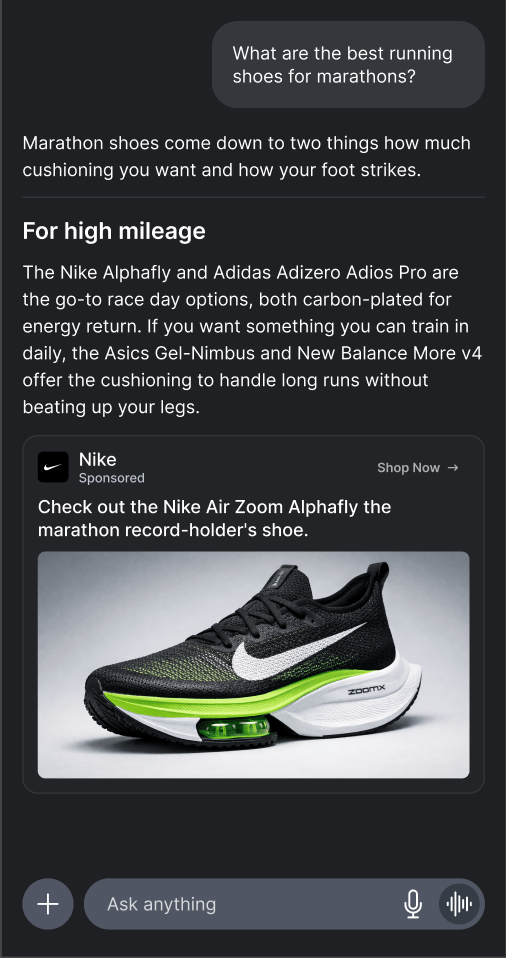 Use when you have a real product photo. `image_url` is required; `logo_url` is optional and recommended (the publisher may render it as a small brand mark next to the image).
Example response:
```json theme={null}
{
"data": {
"bid": 7.50,
"bidId": "bid_abc123",
"ad_data": {
"ad_format": "sponsored_message",
"placement": "image",
"advertiser": "Nike",
"domain": "nike.com",
"headline": "Check out the Nike Air Zoom Alphafly",
"description": "The marathon record-holder's shoe.",
"cta_text": "Shop Now",
"url": "https://example.com/track/click/abc123",
"image_url": "https://cdn.nike.com/alphafly.png",
"logo_url": "https://cdn.nike.com/logo.png",
"view_url": "https://example.com/track/view/abc123"
}
}
}
```
#### `placement="text"` — compact logo card
Use when you have a real product photo. `image_url` is required; `logo_url` is optional and recommended (the publisher may render it as a small brand mark next to the image).
Example response:
```json theme={null}
{
"data": {
"bid": 7.50,
"bidId": "bid_abc123",
"ad_data": {
"ad_format": "sponsored_message",
"placement": "image",
"advertiser": "Nike",
"domain": "nike.com",
"headline": "Check out the Nike Air Zoom Alphafly",
"description": "The marathon record-holder's shoe.",
"cta_text": "Shop Now",
"url": "https://example.com/track/click/abc123",
"image_url": "https://cdn.nike.com/alphafly.png",
"logo_url": "https://cdn.nike.com/logo.png",
"view_url": "https://example.com/track/view/abc123"
}
}
}
```
#### `placement="text"` — compact logo card
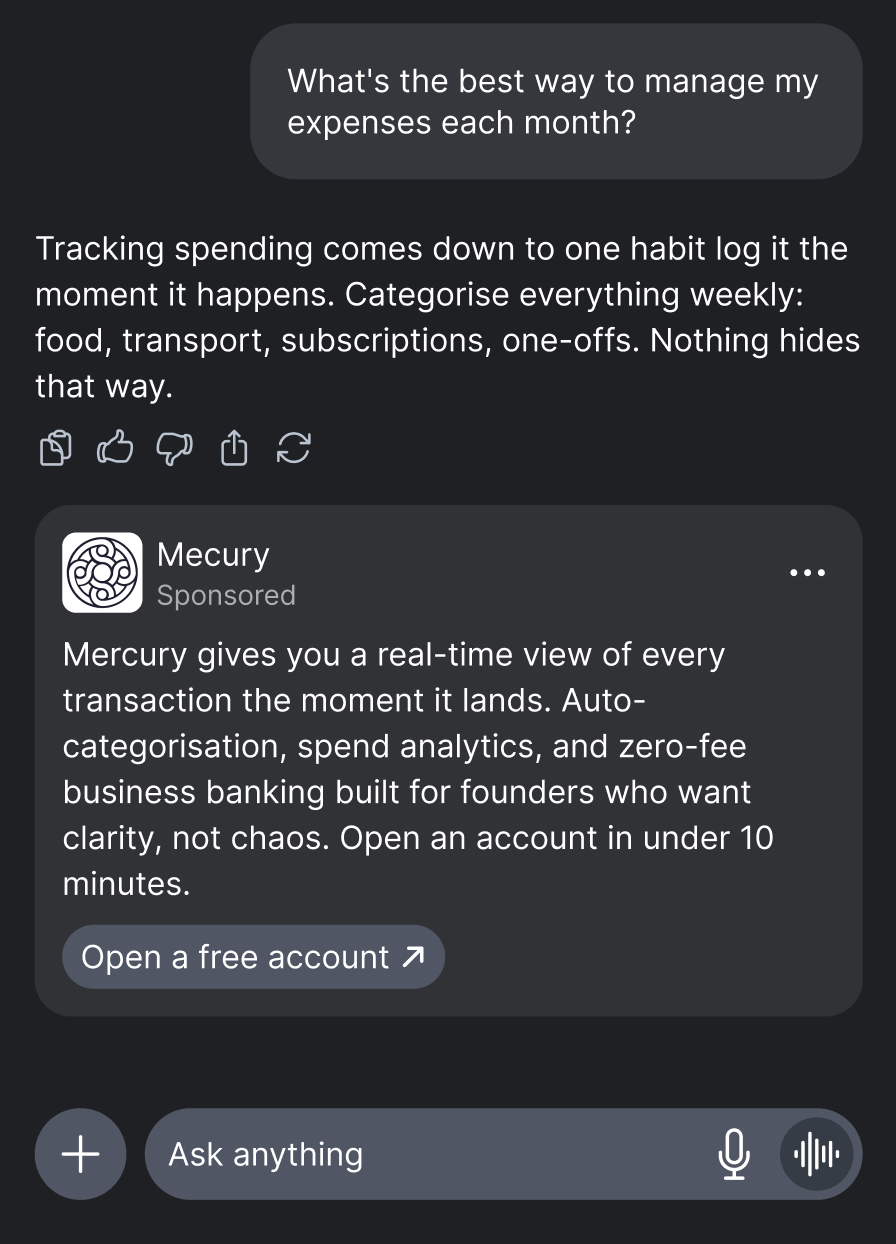 Use when you don't have a real product image — for example, brand awareness creatives, or when the product catalogue only has logo-style assets. `logo_url` is required; `image_url` is ignored if sent.
Example response:
```json theme={null}
{
"data": {
"bid": 7.50,
"bidId": "bid_abc123",
"ad_data": {
"ad_format": "sponsored_message",
"placement": "text",
"advertiser": "Acme Sports",
"domain": "acmesports.com",
"headline": "Best running shoes 2026",
"description": "Get 20% off premium running shoes today.",
"cta_text": "Shop Now",
"url": "https://example.com/track/click/abc123",
"logo_url": "https://cdn.acmesports.com/logo.png",
"view_url": "https://example.com/track/view/abc123"
}
}
}
```
### `sponsored_carousel`
**Beta.** Carousel is in early release. Upcoming improvements: **mixed-brand carousels** (multiple advertisers per carousel) and **per-tile viewability tracking** (which tile was actually viewed vs only rendered). The same-brand and single-`view_url` constraints below will be relaxed in a future version.
Use when you don't have a real product image — for example, brand awareness creatives, or when the product catalogue only has logo-style assets. `logo_url` is required; `image_url` is ignored if sent.
Example response:
```json theme={null}
{
"data": {
"bid": 7.50,
"bidId": "bid_abc123",
"ad_data": {
"ad_format": "sponsored_message",
"placement": "text",
"advertiser": "Acme Sports",
"domain": "acmesports.com",
"headline": "Best running shoes 2026",
"description": "Get 20% off premium running shoes today.",
"cta_text": "Shop Now",
"url": "https://example.com/track/click/abc123",
"logo_url": "https://cdn.acmesports.com/logo.png",
"view_url": "https://example.com/track/view/abc123"
}
}
}
```
### `sponsored_carousel`
**Beta.** Carousel is in early release. Upcoming improvements: **mixed-brand carousels** (multiple advertisers per carousel) and **per-tile viewability tracking** (which tile was actually viewed vs only rendered). The same-brand and single-`view_url` constraints below will be relaxed in a future version.
 A 3-tile horizontal scroller. Constraints:
* **Exactly 3 tiles** (no more, no less).
* **All tiles from the same brand** — cross-brand carousels are rejected.
* **`advertiser` and `domain` required** at the carousel level — shared across all 3 tiles.
* **Per-tile required fields**: `tile_position` (0/1/2), `product_id`, `product_name`, `headline`, `image_url`, `url`, `cta_text`. All mandatory on every tile.
* **Per-tile unique `url`** — required so click attribution can identify which tile was clicked.
* **Single bundled bid price** — you bid once for the whole carousel; the publisher gets all 3 tiles for that price.
* **Single `view_url`** — one impression pixel for the whole carousel, not per tile.
Example response:
```json theme={null}
{
"data": {
"bid": 7.50,
"bidId": "bid_abc123",
"ad_data": {
"ad_format": "sponsored_carousel",
"advertiser": "Acme Sports",
"domain": "acmesports.com",
"logo_url": "https://cdn.example.com/logo.png",
"items": [
{
"tile_position": 0,
"product_id": "sku_peg5",
"product_name": "Pegasus Trail 5",
"headline": "Cushioned trail runner",
"image_url": "https://cdn.example.com/p1.png",
"url": "https://example.com/track/click/abc123?tile=0",
"cta_text": "Shop Now"
},
{
"tile_position": 1,
"product_id": "sku_vom17",
"product_name": "Vomero 17",
"headline": "Max cushion, daily miles",
"image_url": "https://cdn.example.com/p2.png",
"url": "https://example.com/track/click/abc123?tile=1",
"cta_text": "Shop Now"
},
{
"tile_position": 2,
"product_id": "sku_inv3",
"product_name": "Invincible 3",
"headline": "Soft, bouncy ride",
"image_url": "https://cdn.example.com/p3.png",
"url": "https://example.com/track/click/abc123?tile=2",
"cta_text": "Shop Now"
}
],
"view_url": "https://example.com/track/view/abc123"
}
}
}
```
If you can't construct a same-brand 3-tile set with images, fall back to `sponsored_message`.
A 3-tile horizontal scroller. Constraints:
* **Exactly 3 tiles** (no more, no less).
* **All tiles from the same brand** — cross-brand carousels are rejected.
* **`advertiser` and `domain` required** at the carousel level — shared across all 3 tiles.
* **Per-tile required fields**: `tile_position` (0/1/2), `product_id`, `product_name`, `headline`, `image_url`, `url`, `cta_text`. All mandatory on every tile.
* **Per-tile unique `url`** — required so click attribution can identify which tile was clicked.
* **Single bundled bid price** — you bid once for the whole carousel; the publisher gets all 3 tiles for that price.
* **Single `view_url`** — one impression pixel for the whole carousel, not per tile.
Example response:
```json theme={null}
{
"data": {
"bid": 7.50,
"bidId": "bid_abc123",
"ad_data": {
"ad_format": "sponsored_carousel",
"advertiser": "Acme Sports",
"domain": "acmesports.com",
"logo_url": "https://cdn.example.com/logo.png",
"items": [
{
"tile_position": 0,
"product_id": "sku_peg5",
"product_name": "Pegasus Trail 5",
"headline": "Cushioned trail runner",
"image_url": "https://cdn.example.com/p1.png",
"url": "https://example.com/track/click/abc123?tile=0",
"cta_text": "Shop Now"
},
{
"tile_position": 1,
"product_id": "sku_vom17",
"product_name": "Vomero 17",
"headline": "Max cushion, daily miles",
"image_url": "https://cdn.example.com/p2.png",
"url": "https://example.com/track/click/abc123?tile=1",
"cta_text": "Shop Now"
},
{
"tile_position": 2,
"product_id": "sku_inv3",
"product_name": "Invincible 3",
"headline": "Soft, bouncy ride",
"image_url": "https://cdn.example.com/p3.png",
"url": "https://example.com/track/click/abc123?tile=2",
"cta_text": "Shop Now"
}
],
"view_url": "https://example.com/track/view/abc123"
}
}
}
```
If you can't construct a same-brand 3-tile set with images, fall back to `sponsored_message`.